
WooCommerce
Predax Fraud Guard WooCommerce anti-fraud: fake orders, card testing & chargebacks
Fraud screening that runs during checkout, before your payment provider is ever contacted — so a blocked attempt never becomes a gateway fee or a chargeback.
Card testing stops at your checkout, not at your processor. Predax scores the connection behind every order the moment it is placed. Tag-only by default, so nothing is blocked until you decide it should be.
0–100 risk score from VPN, proxy, Tor & datacenter detection
One-click "Connect with Predax" — no API key copy-pasting
Order velocity & disposable-email checks included
Works alongside Stripe Radar & other fraud tools — no conflicts
 Get the Free Plugin
5,000 IP checks/month free · no credit card · official WordPress.org listing · 5-minute setup
Only the checkout IP address is checked — and, if you switch on the disposable-email rule, the domain part of the customer's address (for example gmail.com). The address itself never leaves your store, and no card numbers or other personal data ever do.
Already installed it? Get your free API key
What it actually stops
01
Card testing, before payment is taken
Bots run stolen card numbers through small orders to find live ones. Predax scores the connection before the payment intent is created, so the attempt never reaches your processor.
02
Stolen-card orders shipping abroad
When the billing country doesn't match the country the customer is actually connecting from, the order is flagged — one of the strongest fraud signals there is, and invisible to order-data rules.
03
Guesswork on borderline orders
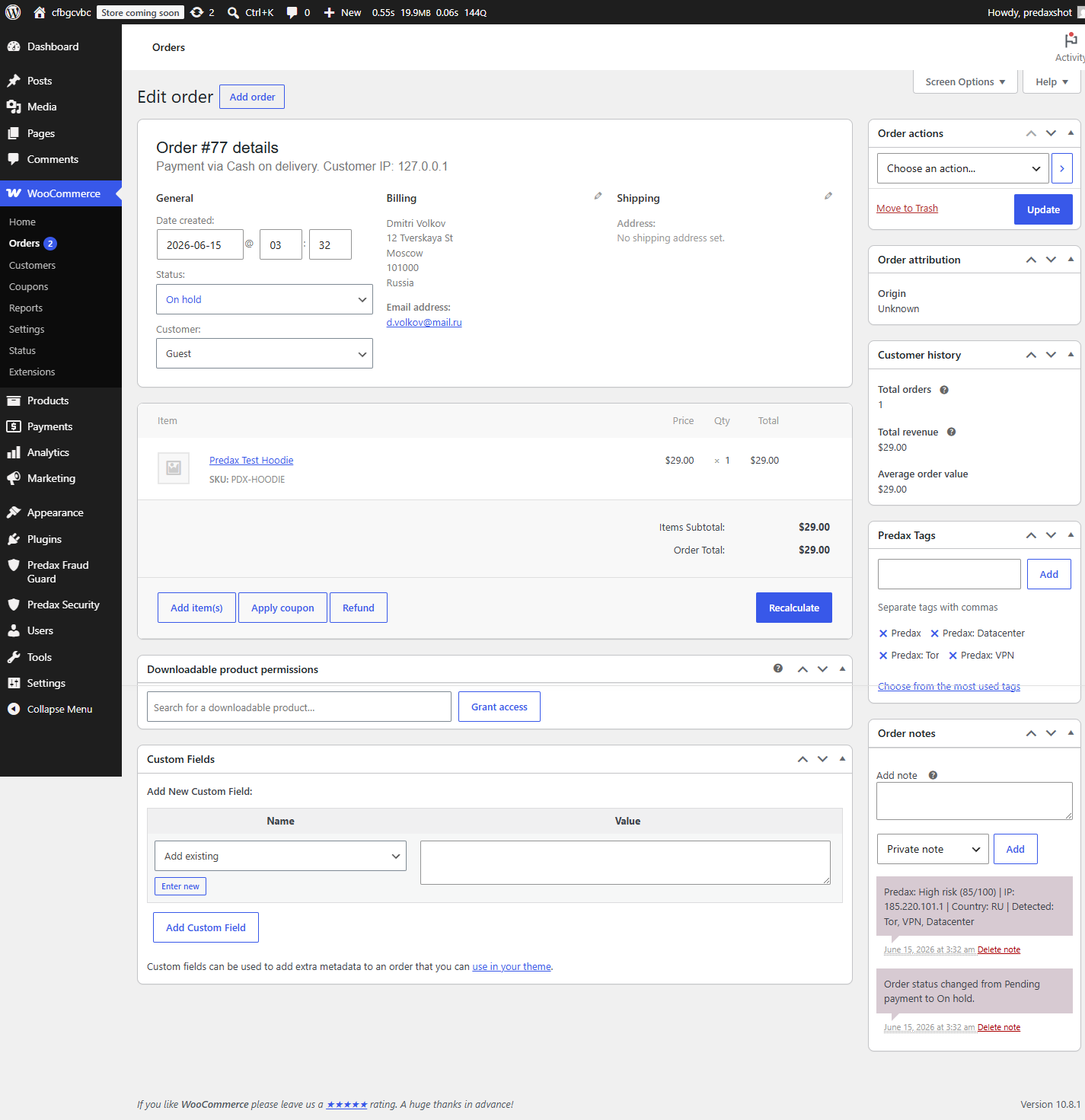
Every qualifying order gets a risk score, threat flags, and a plain-English note attached. You review a short list with evidence instead of eyeballing every order.
See what the plugin sees
This is the same check that runs at your checkout. Try it on your own connection.
Try a flagged one: (Tor exit node)
Will this block real customers?
Short answer: not unless you tell it to.
Nothing blocks by default
Out of the box the plugin runs in tag-only mode. It scores and labels orders so you can watch real traffic before deciding whether to block anything at all.
Checkout can never hang on us
Requests time out at 3.5 seconds, and a circuit breaker fails open the moment the API is slow or unreachable. If Predax has a bad day, your checkout still takes the order.
You set every threshold
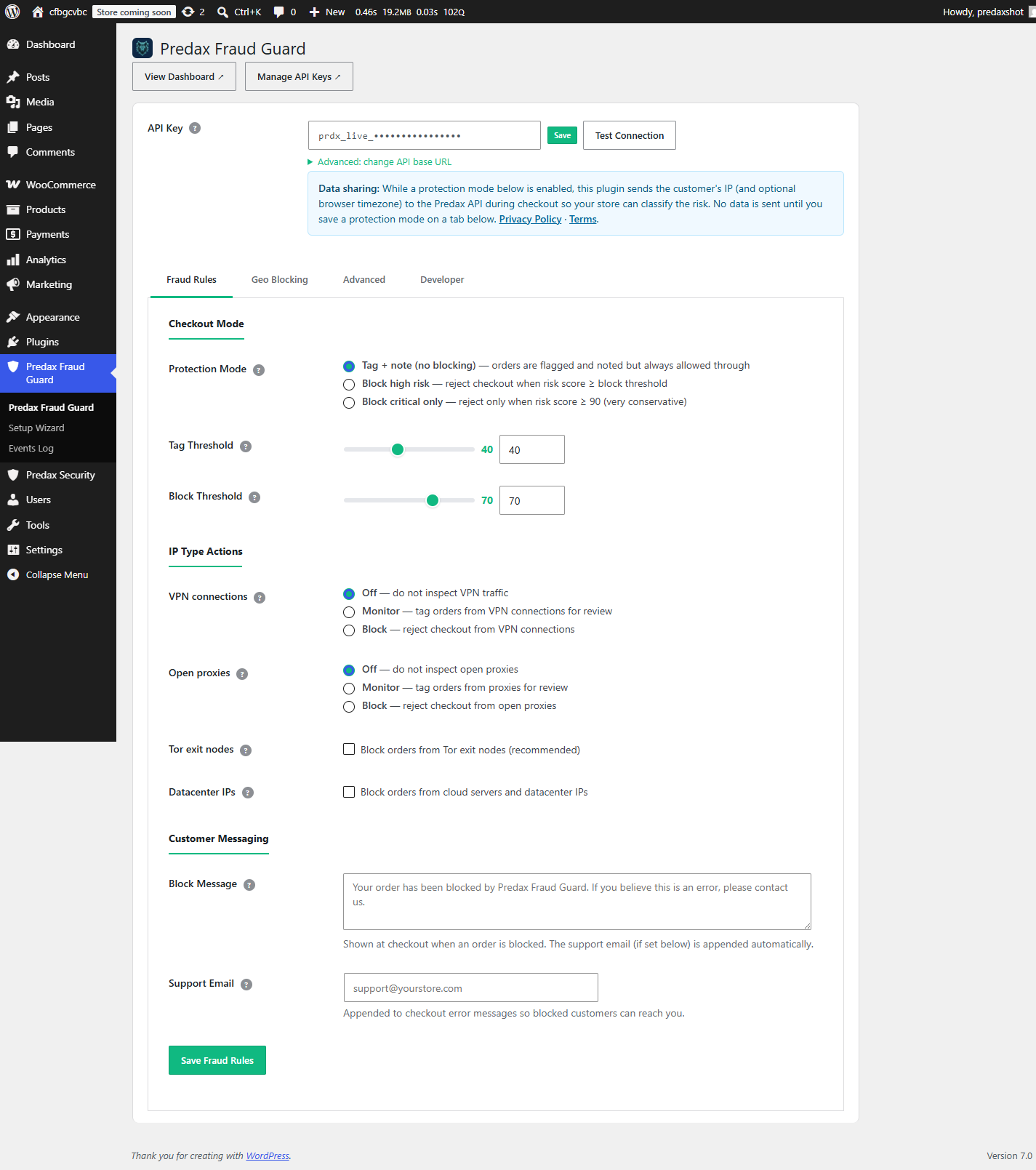
Tag at 40, block at 70, or anything else. Each signal — VPN, proxy, Tor, datacenter — has its own Off / Monitor / Block control.
48
threat feeds tracked
746K
IP ranges classified
3K
Tor exit nodes tracked
24m ago
since last feed update
How is this different from other anti-fraud plugins?
Most anti-fraud plugins score orders using rules about the order itself. Predax adds the signal those rules can't see: who is actually connecting at checkout.
Rule-based fraud plugins
Order-data heuristics
- Score mismatched names, order sizes, email patterns
- Rely on static rules you tune by hand
- Blind to the connection behind the order
Predax Fraud Guard
Live IP intelligence
- Knows if the customer is behind a VPN, proxy, Tor, or datacenter IP right now
- Backed by a continuously updated commercial threat database
- Catches card testing and stolen-card fraud before payment is taken
Works alongside what you already run: pair it with rule-based fraud plugins, payment-processor screening like Stripe Radar, and security plugins like Wordfence (which protect your site, not your checkout). Each catches what the others can't.
Inside your WordPress admin
Real screenshots from the plugin — the Fraud Rules settings, and a screened order with its risk score, flags, and tags.
Everything else included
All of it free, and all of it optional.
+Order velocity — repeat orders from one email or IP
+Disposable email blocking — thousands of throwaway providers, refreshed weekly
+Automatic order hold — route flagged orders to On Hold
+Known-malicious IPs — botnet command-and-control and hijacked ranges
+Risk column on Orders — classic and HPOS order storage
+Events Log — blocked attempts and flagged orders
+Country & region rules — block or flag by geography
+IP allow & deny lists — IPv4 and IPv6 CIDR ranges
+Chargeback feedback loop — auto-deny repeat offenders
+One-click OAuth connect — no API key to copy or paste
+Guided setup wizard — running in under two minutes
+Live API usage meter — your quota, in the settings page
+VPN, proxy & datacenter detection — per-signal Off / Monitor / Block
+Configurable enforcement modes — Tag Only, Block High Risk, Block Critical
+Billing country vs IP mismatch — flag or block on address/connection mismatch
+Real-time checkout risk scoring — risk score, flags & geolocation attached as order notes
Installation
- 1In your WordPress admin, go to Plugins → Add New and search for "Predax Fraud Guard"
- 2Click Install Now on Predax Fraud Guard for WooCommerce, then Activate (requires WooCommerce to be installed)
- 3Open the Predax setup wizard on first activation, or go to WooCommerce → Settings → Predax
- 4Click "Connect with Predax" for one-click OAuth, or paste your API key and click Test Connection
- 5Choose enforcement mode — Block High Risk is recommended for most stores. Enable VPN/Proxy blocking to catch the most common fraud vectors.
Recommended thresholds, order notes and tags, fraud-signal controls and troubleshooting are all covered step by step in the setup guide.
Read the WooCommerce setup guide →Frequently asked questions
Is it really free, or is this a trial?
Free, permanently. The free plan covers 5,000 IP checks per month, which is enough for most small and mid-sized stores — one check runs per checkout, not per pageview. Paid plans exist for higher volume, but nothing expires and no card is required.
What happens if the Predax API is down?
Your checkout carries on as normal. Requests time out after 3.5 seconds and a circuit breaker trips after repeated failures, skipping the check entirely rather than retrying. Fraud screening is never allowed to cost you a sale.
Will it block legitimate customers using a VPN?
Only if you configure it to. VPN handling is a separate Off / Monitor / Block control, and the plugin ships in tag-only mode. The recommended path is Monitor first, review a week of real traffic, then decide.
What customer data leaves my store?
The checkout IP address. If you switch on the disposable-email rule, the domain part of the customer's address is checked too — for example gmail.com, never the address itself and never the part before the @. No card numbers, names, or addresses are sent, and customer emails stored in the plugin's own Events Log are masked on write.
Does it work alongside Stripe Radar or other fraud tools?
Yes, and it is designed to. Radar scores the payment; rule-based plugins score the order contents; Predax scores the connection behind it. They catch different things and do not conflict.
Does it slow down checkout?
One API call is added at checkout validation, capped at 3.5 seconds and typically far quicker. Results are cached, and the circuit breaker removes the call entirely if the API is struggling.
What's new in v1.12.4 (existing users)
- One shopper's screening result can no longer be reused for another — the result also depends on the browser timezone, so on a shared network a mismatch could be inherited by the next genuine customer and get their order tagged or held. Worth updating if you have ever wondered why a good order was flagged.
- The Events Log reason filter works on the Flagged tab — flagged orders were saved without a reason, so the filter returned nothing whatever you picked. They now record the rule that actually fired: order velocity, disposable email, billing mismatch or the risk threshold.
- The Blocks checkout now contributes to the Community Threat Network — only the classic checkout did, so stores on the default checkout received other stores' warnings without contributing any of their own.
- Your allowance goes further — running Predax Fraud Guard and Predax Security together now costs one check per visitor instead of two, and cached results last up to an hour rather than five minutes.
Ready to protect your WooCommerce store?
Get your free API key and start scoring orders in under 5 minutes.
Not ready to install? Try the VPN detection test or check your own IP first.