WordPress Security
Why isn't Predax blocking a VPN, proxy, or bad IP?
A step-by-step checklist for when the plugin is installed but does not block the visitor you expect.
If you enabled blocking but a VPN/proxy/bad IP still gets through, work through this checklist in order. Each item is a real, common cause.
1. Is the detection mode set to "Block"?
Go to Predax Security → Settings → Protection → Detection Modes. VPN Detection and Proxy Detection have three settings: Off / Monitor / Block. Monitor only logs — it does not block. Set the one you want to Block.

See Detection Modes explained.
2. Is "Visitor Screening" turned on?
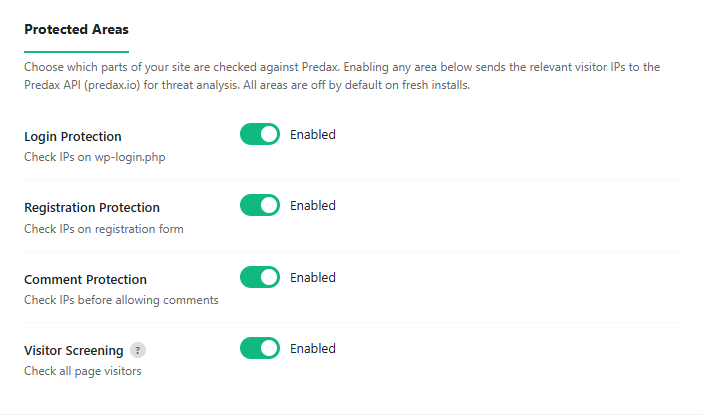
Blocking only happens where the plugin actually checks an IP. To screen normal page visits, turn on Settings → Protection → Protected Areas → Visitor Screening (check all page visitors) — it is off by default. Without it, only login, registration, and comment forms are screened.
3. Are you testing while logged in as an admin?
The plugin never blocks logged-in administrators (so you can't lock yourself out). If you test in the same browser where you're logged into wp-admin, you will never be blocked. Test in a private/incognito window, logged out.
4. Is your site live online, or a local/offline test site?
VPN blocking cannot work on a local or offline site (LocalWP, localhost, XAMPP). On those, the visitor IP is a private address like 127.0.0.1, not a real public VPN IP — so there is nothing for Predax to classify. Test on the live, public site.
5. Did you just change a setting? (1-hour cache)
The plugin remembers a visitor's result for up to 1 hour. If you visited from that IP before turning on blocking, it stays allowed until the cache expires. Test with a fresh VPN server/IP, or wait a few minutes.
6. Is that IP actually a VPN/proxy in our data?
Confirm the IP is classified the way you expect: look it up at predax.io/<the-ip> or the Playground. If it isn't flagged as a VPN, no VPN rule will block it (the IP may be datacenter, proxy, or clean). If you believe it's wrong, email us the IP.
Still stuck?
Email [email protected] with the exact IP, your VPN provider, and whether the site is live or local — we'll check it from our side.