
WordPress
Predax Security VPN, proxy, Tor & bot blocker with firewall, for WordPress
Turns away the traffic that costs you — brute-force logins, spam registrations, scanners and bots — before it reaches WordPress. And it lets you decide, for the first time, which AI crawlers may read your content.
Every login, registration and comment is scored against live IP data — not a static list. Plus per-crawler control: keep Google, decide separately on GPTBot and AhrefsBot — enforced by the IP ranges their operators publish, not a user-agent anyone can fake.
Real-time VPN, proxy & Tor detection — not a cached list
One-click "Connect with Predax" — no API key copy-pasting
Blocks bots at login, registration & comments
Works alongside Wordfence & other security plugins — no conflicts
 Get the Free Plugin
5,000 IP checks/month free · no credit card · official WordPress.org listing · 5-minute setup
Only the visitor's IP address is checked — and, if you switch on disposable-email screening, the domain part of the address (for example gmail.com). The address itself never leaves your site, and neither do names or any other personal data.
Already installed it? Get your free API key
What it actually stops
01
Credential stuffing and brute-force logins
Attackers cycle leaked username/password pairs through wp-login.php from rented infrastructure. Predax scores the connection before the login form is processed, so the attempt is stopped rather than rate-limited.
02
Spam registrations and comment floods
Throwaway signups and comment spam almost always arrive from datacenter IPs, proxies, or Tor. Screening registration and comment submissions removes most of it without a CAPTCHA in front of real readers.
03
Bots probing for known vulnerabilities
Automated scanners hunt for exposed files and vulnerable endpoints across every WordPress site they can reach. Known-malicious networks are recognised on arrival, before they reach your content.
Choose which crawlers may access your site
robots.txt is a request a crawler can ignore. Blocking by user-agent trusts a header any script can fake. Predax blocks crawlers by the IP ranges their operators publish, checked on your own server on every request — so a crawler that ignores robots.txt still gets a 403.
Search engines
Allowed and protected
Googlebot, Bingbot, DuckDuckBot, Applebot. Verified search crawlers stay exempt from your other category rules, so your rankings are never collateral damage.
AI crawlers
Your content, your call
GPTBot, OAI-SearchBot, ChatGPT-User, ClaudeBot, PerplexityBot. Allow them, or turn them away at the door by their published ranges.
SEO crawlers
Your bandwidth, their product
AhrefsBot. Blocking it costs you nothing in your own search rankings.
All three default to allow, so nothing changes until you switch one off. A visitor that merely claims a crawler’s user-agent gets no special treatment in either direction — unverified traffic passes through your normal risk rules. Crawlers that publish no ranges at all (CCBot, Amazonbot, Bytespider) are judged by those rules too.
See what the plugin sees
This is the same check that runs on every login attempt. Try it on your own connection.
Try a flagged one: (Tor exit node)
Will this lock out real users?
Short answer: not unless you tell it to.
Nothing blocks by default
The plugin ships in monitor mode. It scores and logs activity so you can watch real traffic before deciding whether to block anything at all.
Fails open, always
If the Predax API is ever unreachable, the plugin skips the check entirely rather than retrying. Your site never locks out real users because of an API problem.
You control every threshold
Login, registration, comments, and visitor screening each have their own Off / Monitor / Block control and risk threshold — nothing is blocked anywhere you haven't enabled.
Safe mode if you get it wrong
Locked yourself out? One line in wp-config.php (or one WP-CLI command) stops all blocking without deactivating the plugin or touching your settings. Get back in, fix the rule, turn it off.
48
threat feeds tracked
746K
IP ranges classified
3K
Tor exit nodes tracked
59m ago
since last feed update
How is this different from Wordfence?
They solve different problems — and work well together. Scanner-based plugins look at what a request does once it reaches your site. Predax looks at who is connecting, before they do anything.
Scanner-based plugins
Wordfence, Solid Security, and similar
- Scan files for malware after it lands
- Match requests against firewall rule signatures
- React to known attack patterns
Predax Security
IP intelligence, in real time
- Identifies VPNs, proxies, Tor, and datacenter IPs the moment they connect
- Blocks high-risk visitors before they attempt a login, registration, or scan
- Backed by a continuously updated commercial threat database
Run them together: many sites pair Predax with a scanner-based plugin. Predax filters out the anonymous, high-risk traffic at the door; the scanner watches whatever gets through. No conflicts — Predax hooks into login, registration, comments, and page entry, not the file system.
Inside your WordPress admin
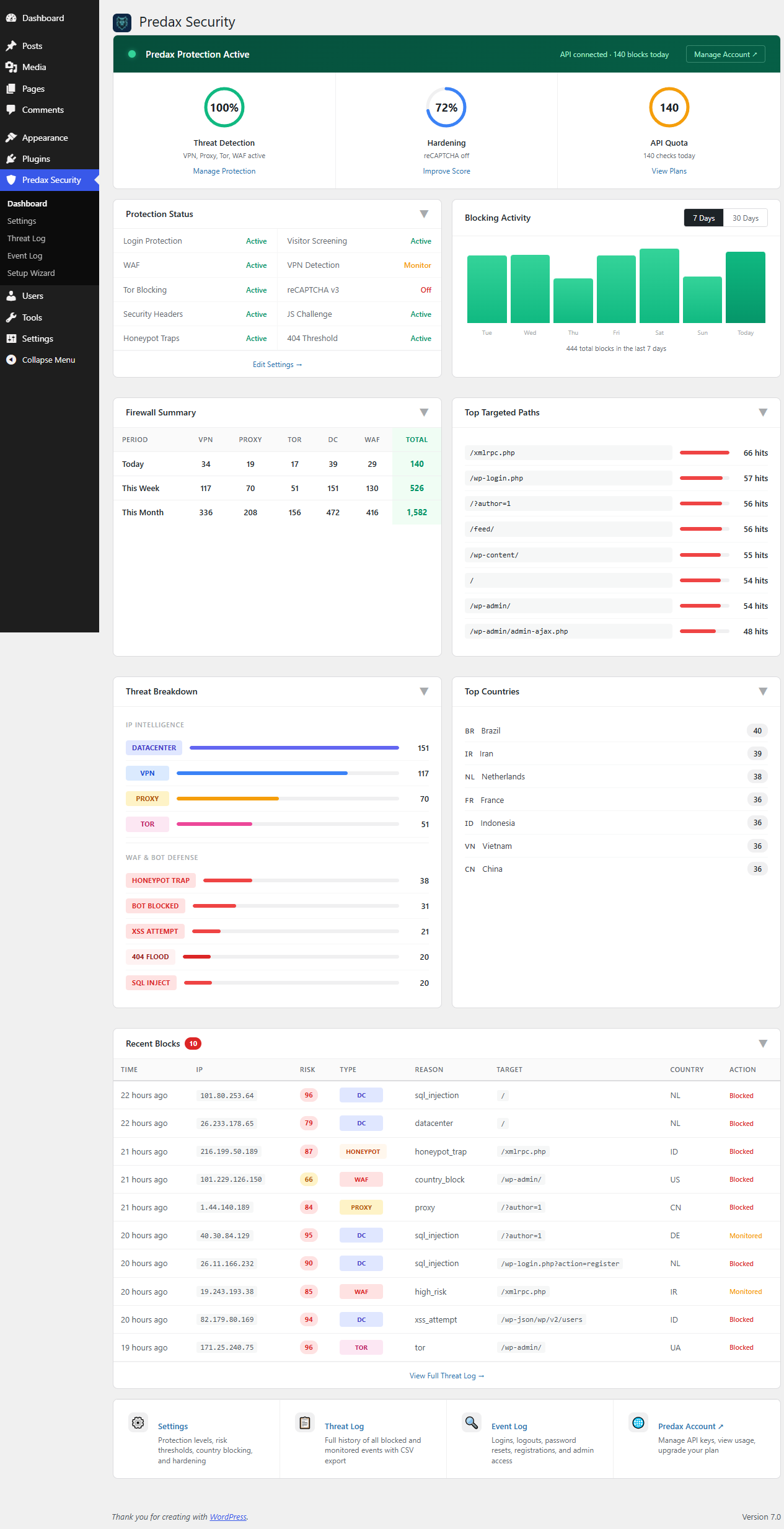
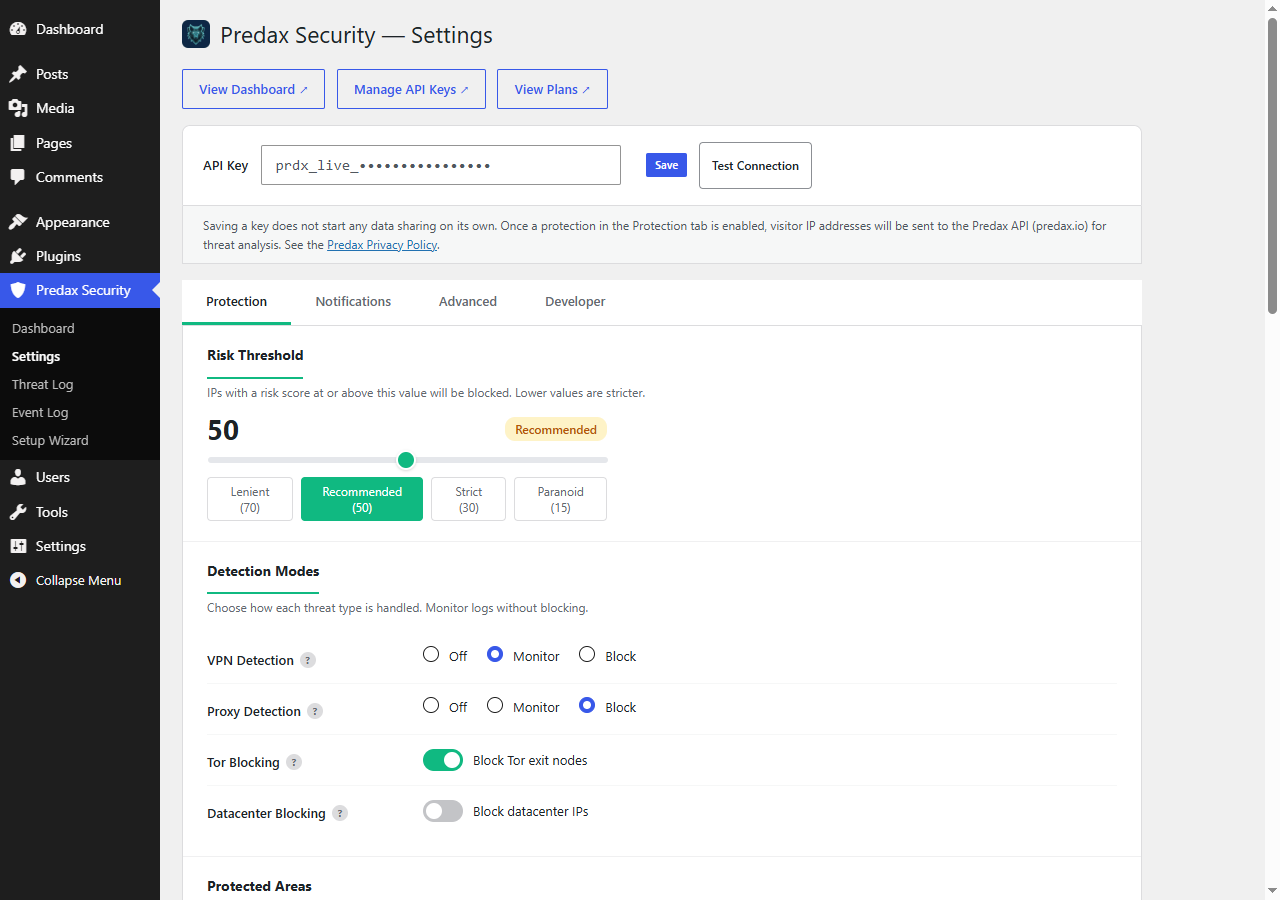
Real screenshots from the plugin — the live security dashboard and the settings panel.
Everything else included
All of it free, and all of it optional.
+Security dashboard — blocking activity chart, top targeted paths, threat breakdown & country analysis
+Anti-bot protection suite — JS challenge, comment honeypot, fingerprint scoring & request pattern analysis
+Google reCAPTCHA v3 — score-based, configurable threshold, fails open on Google outages
+Known bot verification — reverse + forward DNS check for 8 major bot operators
+Honeypot URL traps — 8 configurable trap URLs — any hit is an instant block
+HTTP security headers — one-click HSTS, X-Frame-Options, X-Content-Type-Options & Referrer-Policy
+WordPress hardening toggles — disable XML-RPC, hide the WP version, disable the file editor
+404 threshold blocking — temp-block or blacklist visitors scanning for missing pages
+One-click OAuth connect — no API key to copy or paste
+Guided setup wizard — pick a protection preset and go
+Web Application Firewall (WAF) — SQL injection, XSS, path traversal, file probes & command injection signatures
+Community Threat Network — a block on one site protects every Predax-protected site within seconds
+Lookup & badge shortcodes — [predax_lookup] and [predax_badge] for your own pages
+Login, registration & comment protection — score every attempt against your chosen risk threshold
+All-visitor IP protection — optional page-level checks, cached per IP for an hour
+VPN, proxy, Tor & datacenter detection — per-signal Off / Monitor / Block controls
+XML-RPC & REST API protection — covers common brute-force and scraping vectors
+Custom branded block page — replace the default WordPress error screen
+Disposable email blocking — thousands of throwaway providers, refreshed weekly
+WP-CLI management — status, whitelist/blacklist, threat log & IP testing from the terminal
+Settings import & export — move your configuration between sites
+Country & region geo-blocking — allow or deny by country across every entry point
+Fingerprint rotation detection — spots one browser arriving from many rotating addresses, a scraper’s proxy pool (off by default; Monitor, Challenge or Block)
+Safe mode — one line in wp-config.php or one WP-CLI command stops all blocking if you lock yourself out
Installation
- 1In your WordPress admin, go to Plugins → Add New and search for "Predax Security"
- 2Click Install Now on the Predax Security plugin, then Activate
- 3A new Predax Security menu appears in your WP Admin sidebar (shield icon)
- 4Open the setup wizard, paste your free API key, and click Test Connection
- 5Pick a protection preset (Recommended / Strict / Monitor Only), or set Block / Monitor / Off per entry point — login, registration, comments, and visitors
Recommended thresholds per entry point, threat-signal controls, whitelisting, geo-blocking and troubleshooting are all covered step by step in the setup guide.
Read the WordPress setup guide →Frequently asked questions
Is it really free, or is this a trial?
Free, permanently. The free plan covers 5,000 IP checks per month. Nothing expires and no card is required. Paid plans exist for higher-traffic sites.
What happens if the Predax API is unreachable?
Your site carries on as normal. A circuit breaker fails open after repeated failures, skipping the check entirely rather than retrying — visitors are never locked out because of an API problem.
Will it lock me out of my own site?
No. The plugin ships in monitor mode, so nothing is blocked until you enable it, and your own connection is visible in the threat log before you turn anything on. If you ever do lock yourself out, safe mode (one line in wp-config.php) stops all blocking until you have fixed it.
How is this different from Wordfence?
Wordfence inspects what a request does — scanning files and matching attack payloads. Predax evaluates who is connecting, before the request is processed. They cover different ground and are designed to run together.
What data leaves my site?
The visitor's IP address. If you switch on disposable-email screening, the domain part of the address entered at registration is checked too — for example gmail.com, never the address itself and never the part before the @. No names, no content, and no other personal data are sent.
Does it slow down my site?
Checks run only at the entry points you enable — login, registration, comments, or visitor screening — not on every pageview. Results are cached, and the circuit breaker removes the call entirely if the API is struggling.
What's new in v1.18.0 (existing users)
- The firewall now inspects large form submissions — if a page sent more than 8KB of form fields, every firewall rule except the user-agent check was skipped, so an attack in the URL or a field went uninspected and unlogged. Worth updating even if you change nothing else.
- “Allow this IP” now unblocks someone straight away — ordinary page views recovered, but their wp-json and XML-RPC requests kept being refused for up to an hour, which broke comment forms and block themes for a visitor you had just allowed. Adding an address to the allow-list in Settings takes effect immediately too.
- Stricter login limits apply again to VPN, proxy and Tor addresses — login protection was reading a cached verdict nothing wrote any more, so those addresses were given the relaxed limit meant for clean ones.
- Your allowance goes further — running Predax Security and Predax Fraud Guard together now costs one check per visitor instead of two, and cached results last up to an hour rather than five minutes.
If you run a blog, news or download site, the Recommended preset is the safer choice: a real share of ordinary readers browse via a VPN, and Strict turns all of them away.
Ready to secure your WordPress site?
Get your free API key and start blocking threats in under 5 minutes.
Not ready to install? Try the VPN detection test or check your own IP first.